Press Kit
Everything you need to write about or feature Media Forge. Help yourself to any assets below — no need to ask.
Quick facts
- Name — Media Forge
- Platform — macOS (12 Monterey or later, Apple Silicon and Intel)
- Category — Media library organiser
- Pricing — Annual £3.99/year · Lifetime £19.99 one-time
- Distribution — Mac App Store · Direct download via Paddle
- Developer — Independent, UK-based
- Website — mediaforge.uk
- Contact — support@mediaforge.uk
Short description
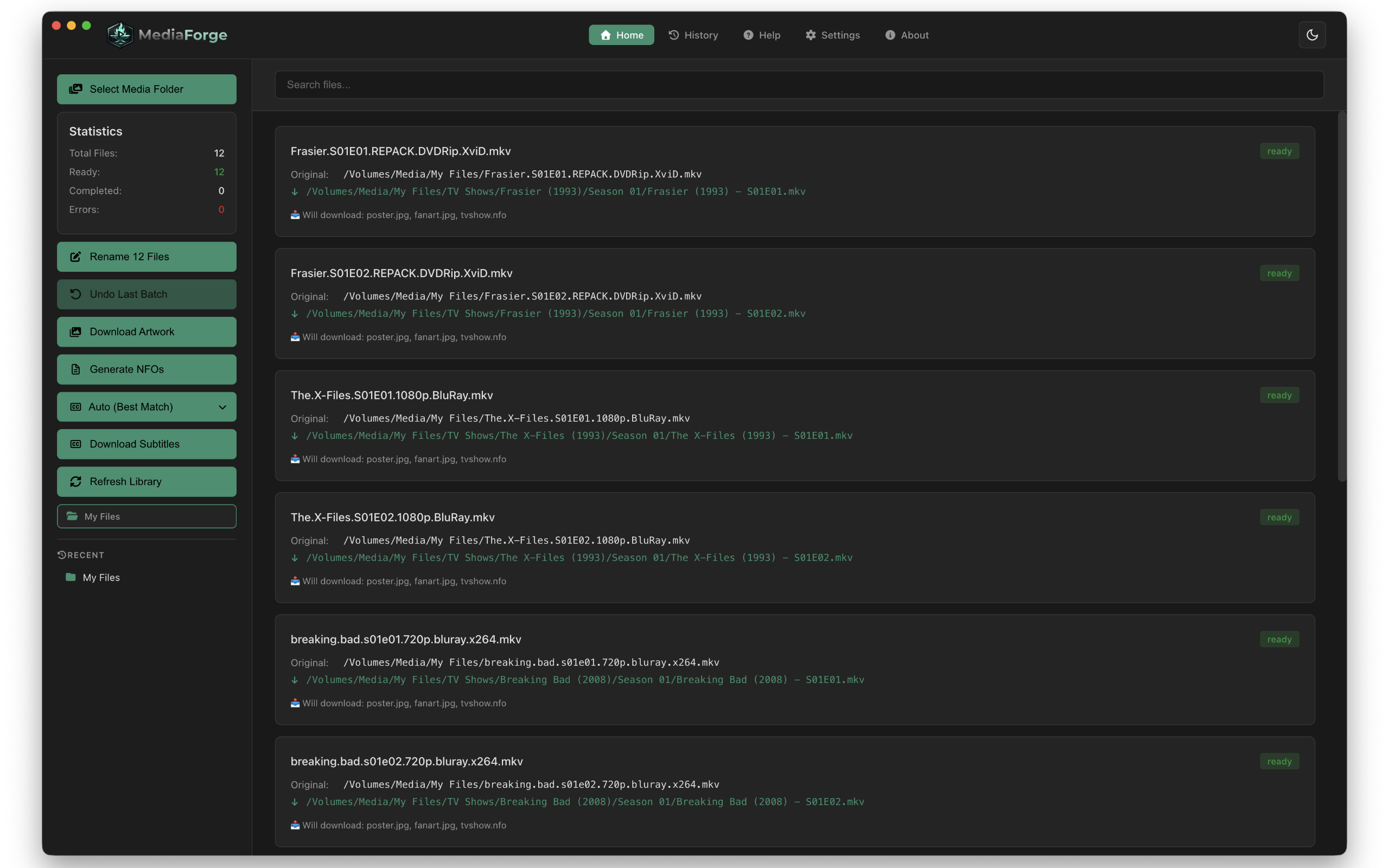
Media Forge is a macOS app that organises home media libraries automatically. It renames unorganised video files, downloads artwork and NFO files, fetches subtitles via Subdl and triggers library rescans on Jellyfin, Emby and Plex — all in one workflow. A built-in Library Manager lets you browse your collection as a visual poster grid and manage artwork for any title.
Long description
Media Forge is built for self-hosted media server users who are tired of manually renaming files, hunting for artwork and chasing subtitle files across multiple websites.
Select your unorganised media and Media Forge identifies each file, proposes a correctly formatted rename, downloads poster, fanart, logo, clearart, banner and disc images, generates NFO metadata files with full cast, plot and rating information, and searches Subdl for matching subtitles. When everything is ready, a single click triggers a library rescan on Jellyfin, Emby or Plex simultaneously.
Every rename is logged with full undo support. Manual overrides let you correct any mismatched file before renaming. A per-show subtitle skip list means you never get prompted for the same show twice. Network drive support with per-file progress keeps large renames visible. Dark and light modes follow macOS system preference automatically.
The Library Manager provides a visual poster grid of your entire library — filter by category, find missing artwork instantly, browse hundreds of alternatives from TVDB and Fanart.tv, and replace any image on disk in one click.
Media Forge is an indie app built by one developer — a twelve-year Plex user and recent Jellyfin user who got tired of doing this manually.
Key features
- Smart rename with manual override
- Library Manager — visual poster grid with artwork browser and missing artwork detection
- Artwork download — poster, fanart, logo, clearart, banner and disc images
- NFO generation — full metadata including plot, ratings, cast and air dates
- Subtitle download — Subdl with auto matching and per-show skip list
- Library refresh — Jellyfin, Emby and Plex with one click
- Rename history with full batch undo
- Network drive support with per-file progress
- Dark and light mode following macOS preference
- macOS safeStorage for secure API key storage
Logos
Both logos are provided on transparent backgrounds. Use whichever works best for your layout. Please do not alter the colours or proportions.

Screenshots
High resolution screenshots available on request — email support@mediaforge.uk and we'll send a full set.
Brand colours
#3D9B7A
#1a1a1a
#ffffff
Press contact
For review copies, promo codes, interviews or any other press enquiries please email support@mediaforge.uk with Press in the subject line. We're happy to provide promo codes for honest reviews.